

Zetta Widget 1.0
Synchronize and customize the settings of DVRs
Share
Program info
Latest version
1.0.11
Developer
Zetta Systems Limited
Freeware
Absolutely free
Mac
Has version
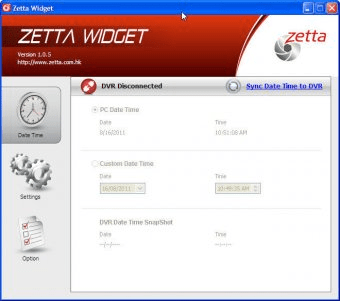
Access and change the custom settings of the DVR in your system. Synchronize time and data according to personal specifications on a computer, input new values to start the calculation and counter anew. Reset defaults and check the local time according to the server.
Zetta Widget is a synchronization tool which helps you to synchronize your dvr with your personal computer.
You can choose from a lot of options to set up you dvr with Zetta Widget like:
- video quality
- resolution
- circular recording
- timestamp
- frame rate
- split file time
- day/night mode
- orientation
- mic and much more
Details
Extensions

No information available
The data will be available later.Old versions

No information available
The data will be available later.


![Download Chrysanth Cheque Writer [Free] for Pakistan](https://img.informer.com/icons/png/16/7042/7042325.png)

Comments
2. Install and run the "Zetta widget" from "Start"->"Program"->"Zetta"->"Zetta Widget" for PC, or "Launchpad" for Mac.
3. Put a microSD card into the DVR and plug the DVR to the computer.
4. To change time, press "Sync Date Time to DVR".
5. To change settings, in "Option" page, change to "Custom Mode", then press "Save Option".
6. In "Settings" page, adjust the settings you want, then press "Sync Settings to DVR".
7. Put the slide switch of the DVR close to the power button before powering up. The DVR will record according to the computer settings.
8. If trigger is enabled, the DVR will first record for 10 seconds. Then it will standby if there is no trigger.
9. If there is a trigger, it will record and record until no further triggers, and keep recording for 5 more minutes and then standby. More